Text and CSV
Text and CSV are both just files; CSV simply agrees that commas separate fields and the first row usually names them.

A spreadsheet is just text with commas in useful places.
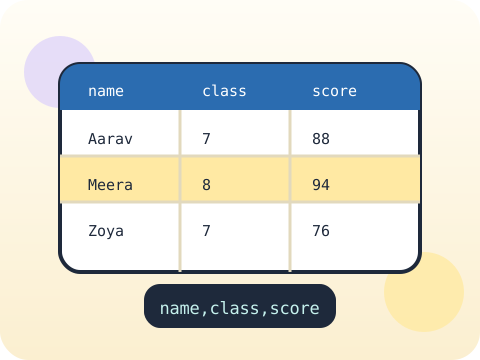
CSV files are the bridge between programs and the real world of data. Students read them, split rows into fields, handle the messy or missing values, calculate something meaningful and write the results back out.
This is the moment coding becomes directly useful for school projects, surveys and any question a student wants answered with evidence.
Three core ideas, each taught with worked examples and then practised until it feels obvious.
Text and CSV are both just files; CSV simply agrees that commas separate fields and the first row usually names them.
Parsing records means turning each line into usable values — splitting, stripping whitespace, converting numbers and deciding what to do with blanks.
Saving results means writing a new file rather than overwriting the original. Raw data is evidence; never edit it in place.
CSV has been in use since the 1970s and remains the most widely exchanged data format on earth — outliving dozens of formats designed to replace it.
“Every row has clean data.” Real datasets contain blanks, typos, extra spaces and numbers stored as text. Handling that is most of the work.
Sessions 25–32 of the 72-session year, at two one-hour sessions per week.
Where this module fits, what you will build, and a hands-on starter that gets everyone curious about text and csv.
Guided teaching on text and csv, worked through together with the teacher.
Independent practice, small challenges and one deliberate mistake to diagnose.
Guided teaching on parse records, building directly on the previous two sessions.
Applied tasks that combine text and csv and parse records in one piece of work.
Save results introduced and practised, completing the toolkit needed for the project.
Guided build session for the module project: Survey analyser.
Finish, test against the checklist, present the work and explain the decisions behind it.
Every module ends with something the student built themselves and can demonstrate. This is the piece that goes into their portfolio and gets explained out loud at the end of session 32.
Run a ten-question survey in your class, save it as CSV, and write a program that reports the average, the most common answer and anything surprising.
Students finishing Module 4 can:
The vocabulary introduced here, in plain language:
6 quick questions drawn from this module — vocabulary, the project you build, and a myth-or-fact round. Every wrong answer explains itself, so a mistake still teaches you something.
Tell us your child’s class and what they enjoy. We will suggest the closest program fit—no pressure and no upfront payment.