
AI classes for kids in Hyderabad that grow with your child.
Children learn how smart technology actually works: what to ask it, how to check what comes back, and how to build something with it. Five separate annual curricula, taught in person, with safety built into the year rather than bolted on.
- ★ Beginner friendly
- ★ Practical projects
- ★ Safe, guided AI use
- ★ Progress updates for parents
What parents should know first
How AI learning is set up here, and what that means for your child.
Quick answer
Brolly Juniors runs AI classes for kids in Hyderabad from Class 6 to Class 10, teaching artificial intelligence as practical literacy rather than a collection of shortcuts. Each class receives its own 36-week, 72-session curriculum with nine modules and a capstone project. No programming is required to begin.
What are AI classes for kids?
Artificial intelligence is technology that learns from information and uses it to do something useful. That is the whole idea — everything else is detail.
What is Artificial Intelligence?
A phone can understand a spoken question. A video app can suggest what to watch next. A map can find a faster route. These are everyday examples of technology using AI to make sense of information and give back something useful.
Tap an everyday example to see the same three steps at work.
It takes in the spoken question.
It compares the question with examples it has already learned from.
It answers the question.
AI classes explain those ideas in a way a child can act on. They sort pictures, compare two answers to the same question, give a tool a clear instruction, and argue about whether what came back is actually right. The ideas stay attached to something they can see and try.
None of it needs technical knowledge to begin. Children first learn what AI is, where it shows up, and how to use it safely — coding and deeper concepts arrive later, when they are useful rather than impressive.
- Learn what AI does →
- Try it →
- Ask questions →
- Create something →
- Use it responsibly
Age-appropriate matters more than fast
A Class 6 child and a Class 10 child can both learn AI, but they need different examples, different session lengths and different amounts of guided repetition. That is why there are five curricula here rather than one — and why children are placed by what they can already do, not only by how old they are.
- Curiosity
- Creativity
- Communication
- Problem-solving
- Responsible technology use
Why should kids learn AI?
The goal is not to make every child an AI expert. It is to help them think clearly, create responsibly, solve problems and make better choices in a world where this technology is already in their hands.
Build future-ready skills
Tools keep changing. A child who knows how to ask questions and work something out can meet the next tool without being taught it.
Easy example: A child meets a new AI app. Instead of just using it, they ask what it does, what information it wants, and whether it is safe.
Practise problem-solving
AI work breaks a large task into smaller ordered steps, which is a habit that transfers well beyond the subject.
Easy example: To build a story, first the character, then the place, then the problem, then the ending.
Grow creativity
A tool can offer options, but the child still chooses. Comparing ideas, improving them and adding their own is the part that stays theirs.
Easy example: A tool suggests three story titles. The child picks one, sharpens it, or writes a better one.
Improve critical thinking
AI is confidently wrong often enough that checking has to become reflex rather than an instruction.
Easy example: A surprising fact comes back. The child checks it against a book, a teacher or a source they trust.
Understand digital tools
Knowing what a tool can do, what it cannot, and what should never be typed into it. That is the difference between using technology and being used by it.
Use AI responsibly
Being honest, safe and fair with it: not sharing private information, not handing in work they do not understand, not using it to mislead someone.
Benefits of AI classes for kids
The skills a child keeps after the tools have changed.
Logical thinking
Putting ideas in order, and seeing how changing one instruction changes the result.
Easy example: The child alters a prompt and compares the two answers side by side.
Creativity
Exploring stories, images, questions and ideas — while learning that the final choice is still theirs to make.
Communication
AI tools reward a clear instruction, so children get repeated practice at saying exactly what they mean.
Problem-solving
A project gives a goal. They try, see what needs to change, and improve it — which is the whole skill.
Confidence with technology
A tool you understand is less intimidating than one you do not. Children learn to explore carefully rather than click blindly.
Project-based learning
Ideas turn into something that can be shown and talked about: a story plan, a chatbot design, an image activity, a solution to an ordinary problem.
What will kids learn?
Seven strands, taught at the depth the class is ready for. Pick one to see what it means in practice.
AI basics
Children learn that AI uses information to find patterns and produce a result — and that it does not think or feel the way a person does. That distinction does more work than it sounds like it should: most of the confusion about AI, in children and adults, starts with treating it as a mind rather than a machine that predicts.
What the curriculum covers
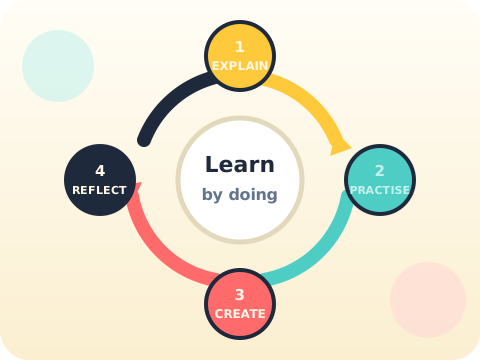
Every module runs the same cycle—explain, practise, create, reflect—so students always finish with something they built and can talk about.
- Prompting and communication
- Research and verification
- Images, audio and video
- Privacy, bias and ethics
Students work with ChatGPT, Claude, image generation tools, ElevenLabs, HeyGen and other age-appropriate platforms. Specific tools may change as safer or more suitable options become available.
A distinct annual curriculum for every class
Not one course delivered five times. Each year has its own nine modules, its own projects and its own capstone.
AI Course · Class 6
Begins with safe exploration and study support.
🤖AI Course · Class 7
Develops prompting, research and multimodal creation.
🤖AI Course · Class 8
Develops prompting, research and multimodal creation.
🤖AI Course · Class 9
Designs applied workflows and builds portfolio capstones.
🤖AI Course · Class 10
Designs applied workflows and builds portfolio capstones.
Age groups and learning levels
No prior coding is needed to start. What decides the right starting point is not the birthday — it is what the child can already do.
Younger students begin with stories, images, sorting activities and simple questions. Students ready for more move sooner into structured projects and the introductory technical concepts.
There is no single starting age that is right for every child. Worth weighing: interest, reading level, comfort with a computer, and whether they can follow a multi-step instruction without losing the thread.
The free trial class is where this gets settled. Your child sits in a real session and we tell you which class curriculum fits — including if the answer is “not yet”.
Age and school level
Lessons should match the class your child is actually in.
Reading level
Comfort with reading shapes how prompting and research get taught.
Interest
Curiosity about technology is what keeps a child in the activity.
Computer comfort
Basic familiarity makes the guided practice go faster.
AI projects for kids
Children learn this by building with it. Try an idea, look at the result, ask why, make it better.
Create a better story prompt
What the child doesWrites a prompt for a short story, reads what comes back, and rewrites the instruction to fix what was wrong.
What the child learnsClear communication, creativity, and the habit of checking generated content.
Plan a simple help bot
What the child doesPicks a purpose — answering questions about a school club, say — and maps the questions it would need to handle.
What the child learnsLogical thinking, conversation flow, problem-solving.
Explore AI image ideas
What the child doesDescribes a safe picture idea with an approved tool and compares how different descriptions change the result.
What the child learnsDescriptive writing, visual thinking, responsible content creation.
Check an AI answer
What the child doesAsks a question, reads the answer, then verifies it against a source worth trusting.
What the child learnsFact-checking, digital awareness, critical thinking.
Solve a daily-life problem
What the child doesTakes something small and real — planning a study timetable — and tests different instructions against it.
What the child learnsBreaking a problem into steps, comparing options, improving a result.
Sort and find patterns
What the child doesGroups objects or pictures by shape, size or colour, by hand, before the words are introduced.
What the child learnsThe ideas underneath data, examples and pattern recognition.
Tools and technologies
Tools are chosen for the class, the learning goal and the safety question — not to be able to list as many as possible. Here is what you are entitled to ask about any of them.
What the tool does
You should be able to understand what it is for and how it helps your child learn.
Age suitability
A tool earns its place in a session only when it fits the class and the level.
Privacy
You should know what personal information must never be typed into it.
Accounts
Whether an activity needs an account, and whose it is.
Guidance
How the activity is supervised while it is happening.
Review
How your child’s work gets looked at and responded to.
Technology supports the learning
A session is not better for having used four tools instead of one. Which tools your child will use is confirmed with you before enrolment, and changes are told to you rather than discovered.
Learning method
A short explanation, an activity, a small project, and clear feedback. Children understand this subject by taking part in it.
- Explain →
- Try →
- Create →
- Ask →
- Improve
Simple explanations
Ideas put in words a child of that age actually uses.
Hands-on activities
They try it rather than watch it being tried.
Age-suitable projects
Project work matched to the class, not to the marketing.
Guided learning
Support arrives during the activity, not after it has gone wrong.
Questions and discussion
Talking an idea through is how it gets understood.
Clear learning goals
You can tell what your child is learning and why.
Why choose Brolly Juniors?
An AI class should help a child understand, practise and use technology responsibly. Everything below follows from that.
Kids-focused learning
AI explained in small steps, in words and examples children can hold on to.
Practical activities
Children use what they learn in the same session they learn it.
Future-ready skills
Problem-solving, creativity, communication, verification, and adapting to new tools.
Parent visibility
You are told what was covered and where your child needs work — not sent a certificate.
Safe and responsible use
Privacy and fact-checking are practised habits, not a slide at the end of term.
No jargon for its own sake
Difficult words are earned. A child who can only repeat “neural network” has not learned anything.
Why parents are wary — and fairly so
Children's technology education in India spent several years being sold with celebrity advertising, scripted teachers and promises about app-building nine-year-olds. A lot of families paid for that and got very little.
We will not claim your child will build a startup. What a year here produces is a child who can prompt precisely, check whether an answer is actually true, and explain what they made and why. Those are the parts that keep working when the tools change.
What in-person actually changes
- Eight children in a room — disengagement shows up the same session, not in month four
- The same educator every week, who knows your child
- Safety habits practised under supervision rather than described in a video
- A project presented aloud at the end of every module
Read our guide on teaching children to use AI tools safely — it is the same material we cover in class, free and without an email wall.
Trainers and mentors
A good mentor makes a hard idea easy. For children that means listening, explaining with familiar examples, welcoming questions, and treating a mistake as the useful part of the session.
For AI specifically, a mentor also has to guide children on online safety, privacy, fact-checking and responsible use — because those come up in the middle of an activity, not on a scheduled day.
Ask us how sessions are guided, how a child gets help when they are stuck, and how project feedback is given. The aim is a room where children can ask, try and improve without worrying about getting it wrong.
What parents can look for
- Simple explanations
- Patience with beginners
- Encouragement to ask questions
- Guidance during activities and projects
- Support with mistakes and improvements
- Attention to safe and responsible AI use
You meet the educator who would actually teach your child at the trial class — not a counsellor.
Class format
What the year looks like in practice.
In person
At the centre near Nizampet X Roads. This is deliberate — technique and disengagement are both visible in a room.
Batch size
Eight children, so every child gets looked at in every session.
Session length
Two one-hour sessions each week.
Programme duration
36 instructional weeks — 72 sessions across the academic year.
Structure
Nine modules of eight sessions, each ending in a project, plus a capstone.
Devices
Provided at the centre. Nothing to buy before you start.
Batch timings
These change through the year as groups fill, so we confirm what is currently open when you enquire.
Parent participation
Not required in sessions. You get a note on what was covered instead.
AI classes fees
The fee depends on the class, the duration enrolled for and what is included, so a single number would be misleading. Tell us your child’s class and we will send the current fee for exactly that.
Nothing is payable before the free trial. You see the session, meet the educator and get the class placement first, then decide.
What to confirm before you pay
- Total programme fee
- Payment options
- Programme duration
- Number of sessions
- What is included in the fee
- Any additional resource costs
Book a free trial class
A trial is how a parent and a child both find out whether this fits. Your child sees how one AI idea gets explained and tries a small activity. You watch whether the explanation lands, whether your child is comfortable, and how questions get handled.
Worth asking while you are there
- Which class your child would join
- The curriculum for that class
- The AI tools used, and how
- Batch timings currently open
- Fees for that programme
- Safety and privacy practices
Request your free trial
Parent support and progress
You should be able to tell what your child is learning, what they are building, and where they need more practice — without having to ask.
The goal is not only to teach a child AI. It is for you to be able to see the learning happening.
Student outcomes
After a year of the programme, a child should be able to do these things — and show you.
Explain AI in simple words
Describe what it is without hiding behind technical language.
Identify common uses of AI
Recognise it in the things they already use every day.
Write clearer prompts
Give an instruction precise enough to get what they meant.
Check AI answers
Verify a result instead of trusting it on sight.
Protect personal information
Know what never goes into a tool.
Use AI tools responsibly
Honestly, safely, and without passing off work they do not understand.
Complete an AI project
Finish something and explain how they got there.
Solve problems step by step
Break a task down instead of stalling at the size of it.
Build technology confidence
Meet an unfamiliar tool without needing to be walked through it.
Outcomes vary, and we will not pretend otherwise
Every child learns at a different pace, and results depend on age, interest, level, practice and participation. These are learning goals, not promises about marks, jobs, placements or future careers. What we are aiming at is a child who understands AI clearly enough to keep learning about it without us.
How to choose the right AI class for your child
Useful whether or not you choose us. Ten questions worth asking any provider before you pay.
Check age and learning suitability
Ask how lessons differ between school levels. A Class 6 child and a Class 10 child should not be in the same syllabus with the hard parts removed.
Review the curriculum
Look for a path. Children should understand the basic ideas before being handed advanced tools.
Understand the teaching method
Ask how much of a session is explanation and how much is the child doing something. Watching is not learning.
Look at the projects
Ask what your child will build and which skill each project develops. Vague answers here usually mean vague projects.
Ask about mentor quality
Knowing the subject and being able to explain it to a ten-year-old are different abilities. Ask how mentors handle questions and mistakes.
Check safety and privacy
Which tools, whether accounts are needed, and what happens to personal information.
Confirm parent communication
How you will hear about topics, projects, feedback and progress — and how often.
Ask about class size
It decides whether your child can ask a question. Confirm the number rather than assuming it.
Focus on real outcomes
Understanding AI, checking information, solving problems, finishing a project. Be wary of anyone promising careers, placements or app-building nine-year-olds.
Attend a trial
The fastest way to find out whether the teacher, the language and the level suit your child.
Understand
Clear explanation
Practise
Guided activities
Create
Visible outcomes
Frequently asked questions about AI classes for kids in Hyderabad
What are AI classes for kids in Hyderabad?
What age can kids start learning AI?
Is coding required to learn AI?
What do kids learn in AI classes?
Is AI safe for children?
Which AI tools will students use?
What projects can kids build in AI classes?
How do AI classes help children?
What is the difference between AI and coding classes?
Can children learn generative AI?
How many sessions are included?
How much do AI classes for kids cost?
Are online or offline AI classes available in Hyderabad?
Is there a free trial class?
How can parents choose the right AI class for their child?
AI classes for kids — quick answers
Short, direct answers to what parents ask most often.
Online or in person?
In person, at the centre at Nizampet X Roads. With eight children in a room, disengagement shows up the same session.
AI learning for families in Hyderabad
Children across Hyderabad already use this technology every day — search suggestions, voice assistants, video recommendations, creative tools. These classes give those everyday experiences an explanation.
The Brolly Juniors centre is at Nizampet X Roads. Families across the north-west of the city travel in; if that is difficult from where you are, tell us and we will say honestly whether it is workable rather than sell you a commute.
Visit us
Metro Pillar No. A689, Dr Atmaram Estates, 3rd Floor, Nizampet X Roads, Nizampet, Hyderabad, Telangana, 500072
Beside Sri Bhramaramba Theatre, near JNTU Metro Station.
Looking for AI classes for kids near me?
Parents searching nearby want to know two things: whether it is close enough to attend, and whether it suits their child.
Tell us your locality
Say which part of Hyderabad you are in and we will tell you honestly whether the travel is workable.
Ask about timings
Batches change through the year. We will tell you which are currently open for your child’s class.
Start with a trial
The simplest way to check whether the class suits your child before committing.
Explore more kids learning programs
Children who take to AI often enjoy these too.
Python & coding
Step-by-step instructions to a computer — the natural companion to AI.
🤖Robotics
Hands-on building and problem-solving through guided activities.
♟️Chess
Planning, patience and thinking a few steps ahead.
➗Vedic maths
Faster mental calculation through pattern-based techniques.
🧮Abacus
Focus, working memory and number confidence on the bead frame.
📚School tuitions
Academic support alongside the skill programmes.
Your child's free trial is one message away.
Tell us your child’s class and what they enjoy. We will suggest the closest program fit—no pressure and no upfront payment.