Nursery, LKG & UKG · Ages 3–7

A free preschool games app for little explorers.

Pop a letter. Explore a number. Discover a new world. Brolly Wonder Preschool Games brings words, maths, space and nature together in a playful learning adventure for your child.

Brolly Wonder app icon: a colourful umbrella over an open book
Brolly Wonder Preschool GamesBy Brolly Software Solutions Pvt Ltd

Completely free to download and use. Android app · Contains ads.

  • Words, maths & discovery
  • Games & rewards
  • Parent progress view
Inside Brolly WonderFree to play
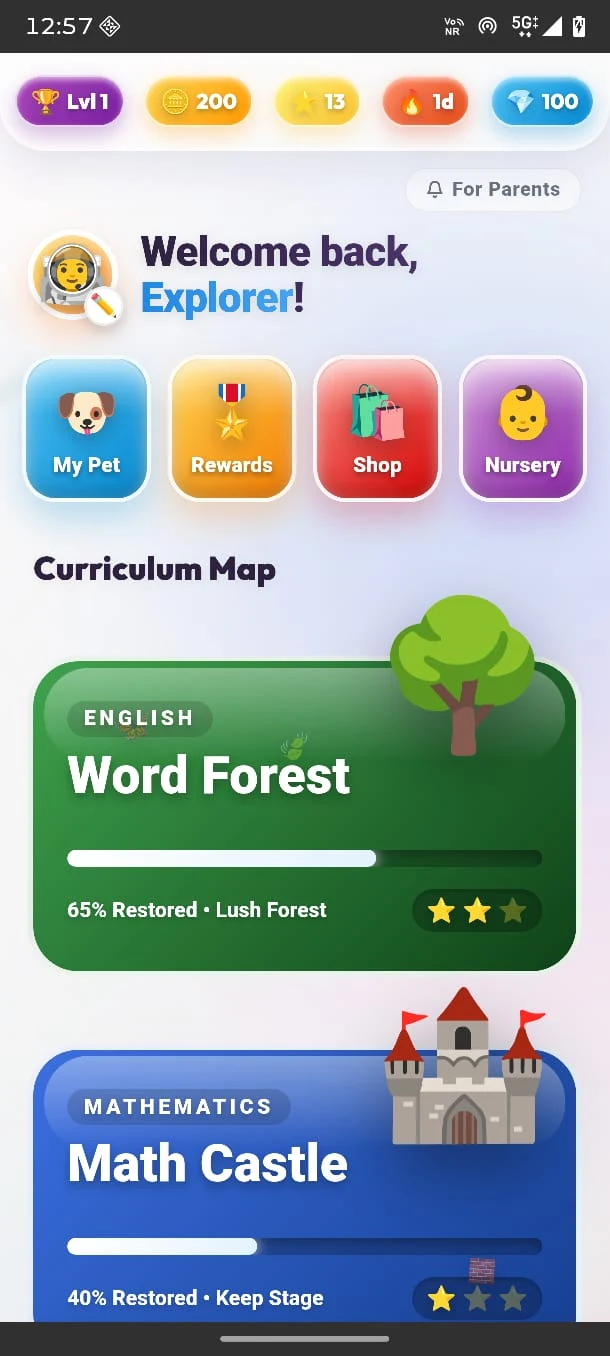
Curriculum map showing Word Forest and Math Castle progress
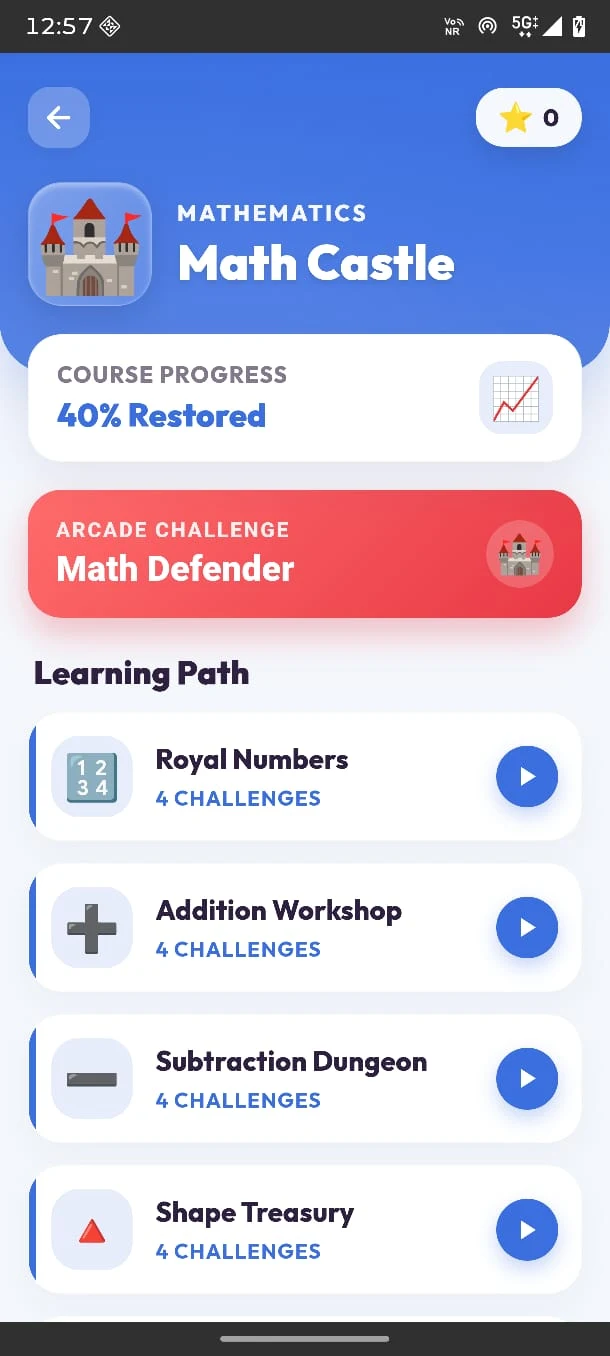
Math Castle with numbers, addition, subtraction and shape activities

Little steps. Lots to discover.

Words & sounds

Letters, word families and playful English practice.

Numbers & shapes

Comparisons and early maths in Math Castle.

Space & nature

Dinosaurs, ocean life and new discoveries.

Games & rewards

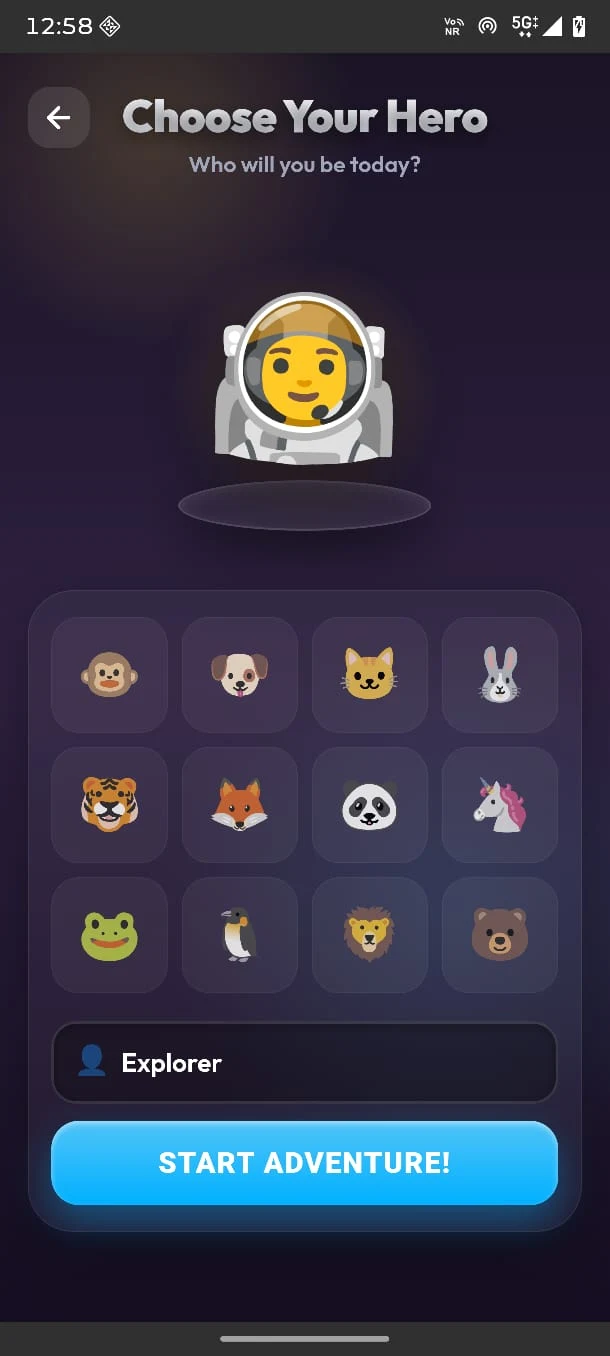
Choose a hero and enjoy the adventure.

Parent progress

Follow learning and choose what to revisit.

Quick answer

Brolly Wonder is a completely free preschool learning games app for Android, intended for children aged 3–7. It combines early English, maths and discovery activities with games, themed learning worlds, rewards and a parent dashboard. Presented by Brolly Juniors and developed by Brolly Software Solutions Pvt Ltd, it is available on Google Play and contains ads.

The idea

What is a preschool games app?

A preschool games app gives young children a way to practise early concepts by interacting with activities on a phone. A child might recognise a letter, compare two numbers or explore a new topic while playing.

In Brolly Wonder, these activities sit inside a connected adventure. Children choose a hero, visit colourful worlds and follow learning paths that give each new activity a place in the journey.

Something to do. Something to discover.

Alphabet balloon popping brings letters into play. Math Castle introduces number challenges. Dinosaur, space and ocean themes give children more to explore and talk about.

Start with something your child recognises, then try a new activity together. The aim is enjoyable practice at a comfortable pace.

What is inside

One adventure. Many learning worlds.

Preschool learning games that bring early English, maths and discovery together. Choose a familiar subject or follow your child’s curiosity.

Letters, sounds & words

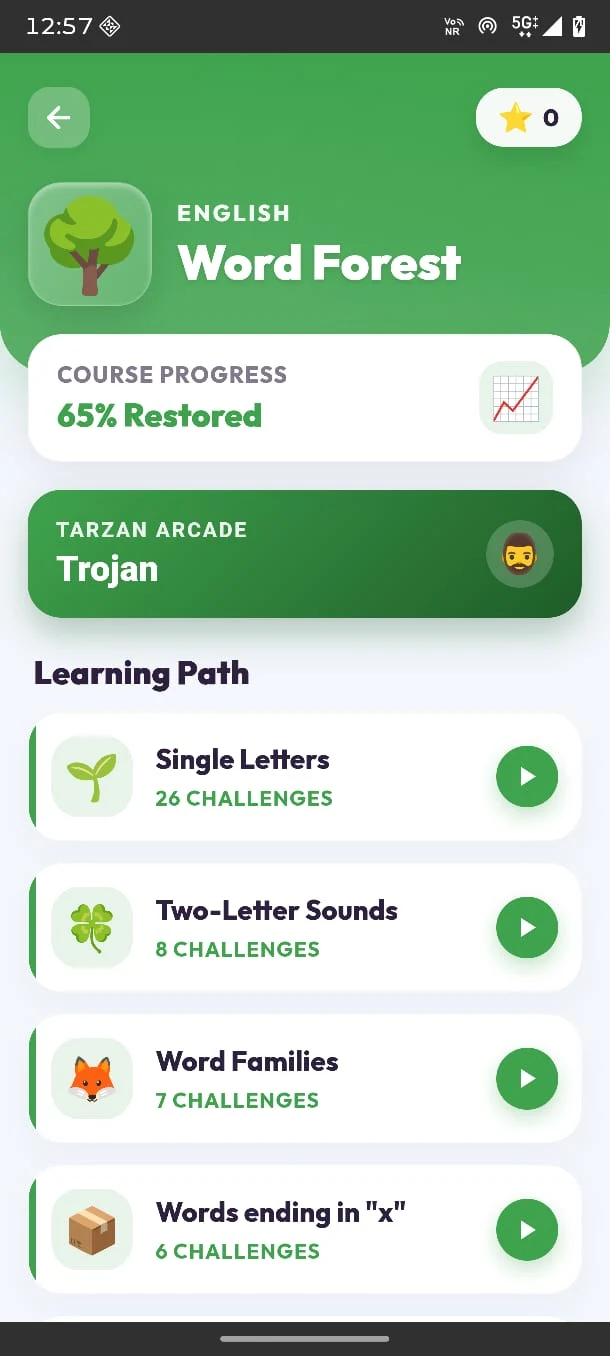
Word Forest

Explore single letters, two-letter sounds, word families and word activities. Alphabet games for kids, including balloon popping, make letter practice part of the adventure.

Practice focus

Recognising letters and exploring how sounds and words connect.

Numbers, shapes & early maths

Math Castle

Explore number activities, greater-than and less-than comparisons, shapes, addition and subtraction. Preschool maths games and the Math Defender activity bring number practice into play.

Practice focus

Recognising numbers, comparing values and trying early calculations.

Questions beyond our world

Space discovery

Explore space-themed activities and the observatory destination. A new topic gives little explorers something to notice, name and talk about with a parent.

Try together

Ask your child to describe one thing they discovered.

A journey into prehistoric life

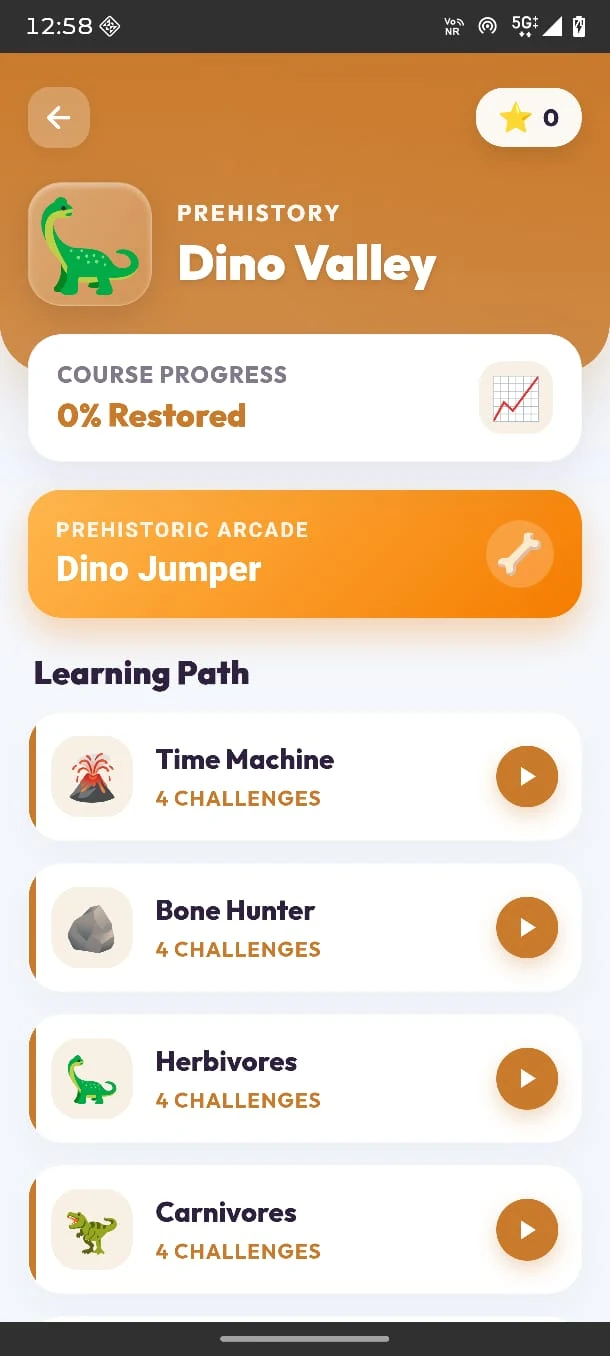
Dino Valley

Visit the Time Machine, explore dinosaur topics and discover herbivores and carnivores. The Dino Jumper activity adds a playful stop along the learning path.

Practice focus

Exploring new vocabulary and grouping dinosaurs by what they eat.

Marine life & the natural world

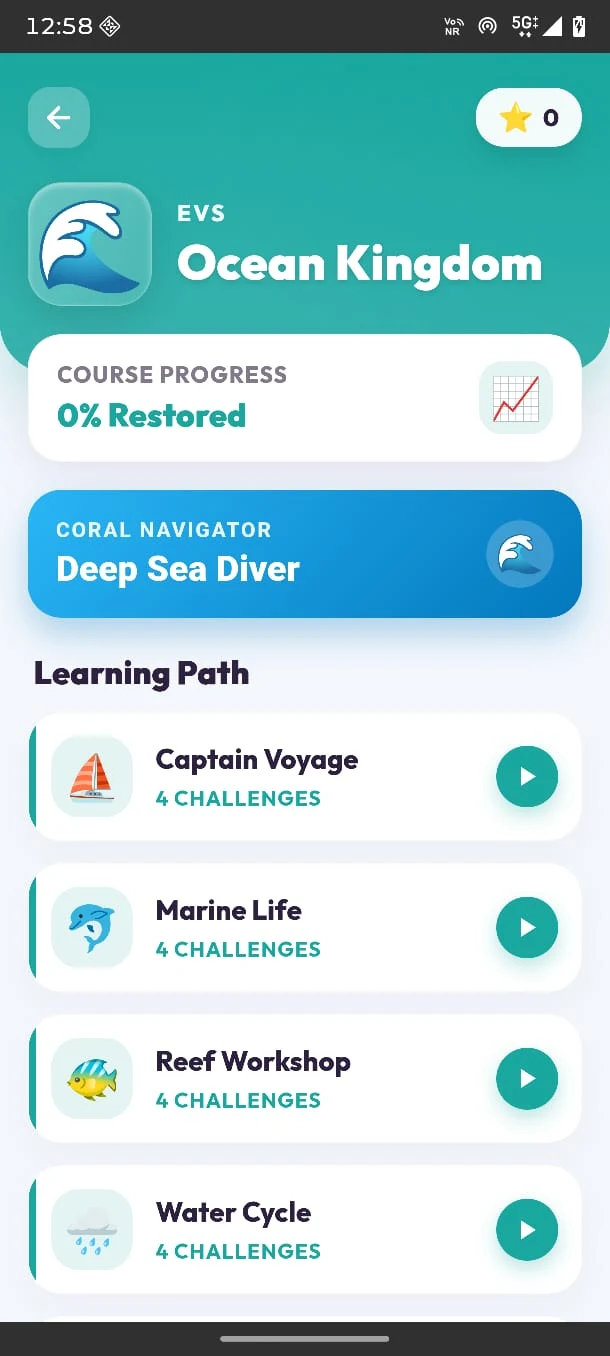
Ocean Kingdom

Explore marine life, reefs and the water cycle in an ocean-themed world. The Deep Sea Diver activity adds another way to enjoy the journey.

Try together

Talk about a sea creature or where rain comes from.

A path through discovery

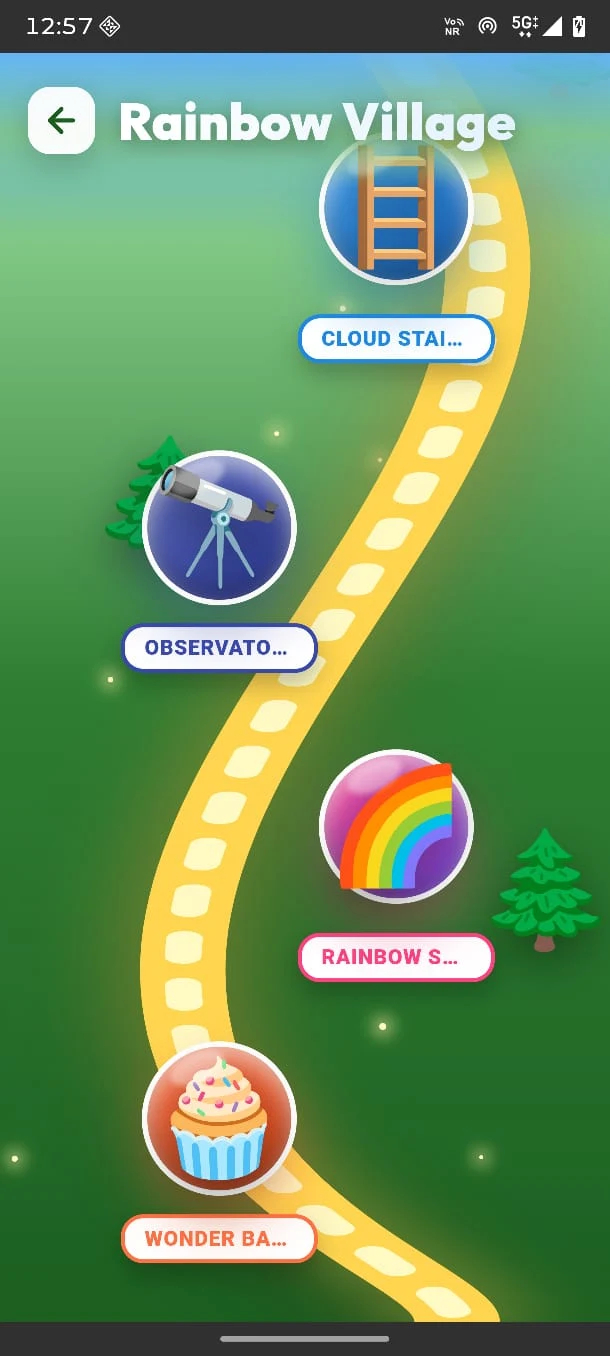
Rainbow Village

Follow a colourful route connecting themed destinations. The village map gives children a visual way to explore and choose where their adventure goes next.

Experience

A connected journey with places to visit and activities to discover.

Take a look

A little peek inside the adventure

Explore the actual app screens: learning worlds, character choices, progress and a colourful path through discovery.

Screenshots from the official Google Play listing. Swipe, scroll or select an image to take a closer look.

Start where your child is

Preschool games for nursery, LKG and UKG

The main focus is ages 3–5, with suitable activities for children up to age 7. These are starting suggestions; choose by your child’s current understanding.

Ages 3–4 · Nursery / pre-KG

Notice, recognise & explore

Looking for preschool games for 3 year olds? Begin together with familiar letters, numbers, shapes or a discovery theme your child enjoys.

  • Try a short, simple activity.
  • Name what appears on the screen.
  • Help with instructions and navigation.
Ages 4–5 · LKG / UKG

Practise little connections

Preschool games for 4 year olds and 5 year olds can bring variety to letter, word and number practice. Follow your child’s interest through Word Forest and Math Castle.

  • Explore letters, sounds and words.
  • Compare numbers and recognise shapes.
  • Talk about discoveries in new worlds.
Ages 6–7 · Early primary

Revisit & try a challenge

Children who still enjoy kindergarten learning games can revisit familiar concepts and explore suitable word or maths challenges with a parent’s guidance.

  • Try early addition and subtraction.
  • Revisit a topic that needs practice.
  • Explain how an answer was chosen.

School-stage ages vary. This guide describes ways to use the app; it is not a school-board syllabus or a developmental assessment.

Learning through play

What can children practise?

Educational games for kids work best when the activity has a clear purpose. Brolly Wonder gives families a collection of topics to revisit through play, from recognising a letter to comparing numbers.

Use the game as a conversation starter: “Which number is bigger?” “What word did you see?” “What did you discover in the ocean?” Let your child explain in their own words.

  • Letter recognition
  • Letter sounds
  • Word families
  • Numbers
  • Greater than / less than
  • Shapes
  • Addition
  • Subtraction
  • Space discovery
  • Dinosaurs
  • Marine life
  • Water cycle

Follow the journey together

The app includes learning-progress tracking and a parent dashboard, so parents can stay involved as their child explores.

  • Look at progress in the learning worlds.
  • Ask which activity your child enjoyed.
  • Revisit familiar material when helpful.
  • Choose the next activity together.

Rewards celebrate participation and progress. Learning develops through practice, conversation and support.

How it works

Download. Explore. Play.

Three simple steps to start using this free preschool games app on a compatible Android device.

Open Google Play

Use the download button to visit the official Brolly Wonder listing. Check device compatibility and select Install.

Choose a starting point

Open the app with your child, choose a hero and explore the curriculum map. Start with a familiar word, number or discovery activity.

Practise & discover

Try a learning challenge, enjoy a game and talk about what happened. Use the progress view to decide what to revisit next.

Android · Completely free · Contains ads

Practical details

Completely free. Ready to explore.

No course enrolment is needed. Download Brolly Wonder and use it as an additional learning resource at home.

Brolly Wonder at a glance
AppBrolly Wonder Preschool Games
PriceFree to download and use. No subscription required.
PlatformAndroid, through the official Google Play listing.
Intended learnersAges 3–7; primary focus on nursery, pre-KG, LKG and UKG children aged 3–5.
Learning areasEarly English, numbers, shapes, early maths, space and nature discovery.
Parent featuresLearning-progress tracking and a parent dashboard.
AdvertisingContains ads, as stated on Google Play.
DeveloperBrolly Software Solutions Pvt Ltd
Privacy & supportRead the app privacy policy or see app support on Google Play.
At home

Make a little room for discovery

A few ways to keep preschool learning games connected to everyday learning.

Explore together first

Sit beside your child while they get used to the app. Read instructions, explain unfamiliar words and let them make the choices they can manage.

Talk about the answer

Ask what they noticed or why they chose a number. A small conversation can connect the tap on the screen with the idea behind it.

Continue away from the screen

Find a letter in a book, compare groups of toys or draw a sea creature. Let the app be one part of a day that also includes play, movement and rest.

The Brolly family

Who is behind Brolly Wonder?

Brolly Wonder is developed by Brolly Software Solutions Pvt Ltd and presented here by Brolly Juniors. It brings our interest in playful learning into an Android app families can use at home.

Brolly Juniors also offers children’s learning programmes in Hyderabad. The app is available independently: you do not need to enrol in a class to use it.

A resource alongside everyday learning

Brolly Wonder offers opportunities to practise and explore. Keep books, hands-on play and conversations part of the experience, and choose activities that suit your child.

If you want guided classes as well, explore the related Brolly Juniors programmes below.

Questions & answers

Preschool games app: parent FAQs

Clear answers about the learning experience, free access and getting started.

What is Brolly Wonder Preschool Games?

Brolly Wonder is a free Android preschool games app that combines early English, maths and discovery activities with interactive games. Children explore themed learning worlds, choose a hero, earn rewards and revisit learning challenges. It is presented by Brolly Juniors and developed by Brolly Software Solutions Pvt Ltd.

Is this preschool games app completely free?

Yes. Brolly Wonder is completely free to download and use. There is no subscription required for the learning experience described on this page. The Google Play listing states that the app contains ads.

What age is Brolly Wonder suitable for?

Brolly Wonder is intended for children aged 3–7, with a primary focus on nursery, pre-KG, LKG and UKG learners aged 3–5. Parents can choose activities according to what their child already knows. Younger children may need help reading instructions and navigating the app.

What subjects can children explore?

Children can explore letters, sounds and words; numbers, shapes, greater-than and less-than comparisons; early addition and subtraction; and discovery themes including space, dinosaurs and ocean life. The learning worlds bring several early-learning subjects together in one app.

Does the app include games as well as lessons?

Yes. The experience combines learning paths with games and interactive challenges, including alphabet balloon popping and themed activities such as Math Defender, Dino Jumper and Deep Sea Diver. Children also choose a hero and collect rewards as part of the adventure.

Can parents follow their child’s progress?

Yes. Brolly Wonder includes learning-progress tracking and a parent dashboard. Parents can review progress and help their child decide which activities to revisit or explore next.

How do I download the app on Android?

Select a Google Play download button on this page to open the official Brolly Wonder listing. Check compatibility with your device, select Install and open the app. Choose a starting activity together with your child.

Do we need to join Brolly Juniors classes first?

No. The app can be used independently of Brolly Juniors classes. Families can download it from Google Play wherever the listing is available for their device and country.

Does Brolly Wonder replace preschool or kindergarten?

Brolly Wonder is an additional practice resource for home learning. Use it alongside conversations, books, play, movement and classroom learning. Parents and teachers remain important for explaining ideas and responding to a child’s questions.

Who develops Brolly Wonder?

Brolly Wonder is developed by Brolly Software Solutions Pvt Ltd and presented here by Brolly Juniors. The official Google Play listing provides app support, update information and the app’s privacy policy.

A new world is waiting

Your little explorer’s next adventure starts here.

Words, numbers, dinosaurs and discoveries. Bring a little more play into early learning with Brolly Wonder Preschool Games.

Completely free to download and use · Ages 3–7 · Android · Contains ads

Brolly WonderFree preschool games · Android
Get the app