Foundation
Meet the abacus, learn what each bead is worth and read numbers up to 99.

Set a number. Move a bead. Picture the frame. Abacus Experts brings guided soroban lessons, instant feedback and timed practice to your child’s Android phone, alongside their abacus classes.

Free to download · Android · No ads. Sign-in needs the account set up when your child enrols in our abacus classes.
One bead at a time.
Move heaven and earth beads on a real layout.
Every lesson opens with a step-by-step walkthrough.
Each answer is checked, with the method shown.
Drills against the clock build speed.
Streaks, accuracy, skills mastered and test results.
Abacus Experts is the abacus app for kids enrolled in Brolly Juniors abacus classes. It brings the soroban to an Android phone with eight levels and 30 lessons, an on-screen abacus that students move bead by bead, guided walkthroughs, instant feedback, timed practice, level test results and badges. It is free to download on Google Play with no ads, and students sign in with the account set up when they enrol.
Abacus Experts is free to download, but it is the practice app for children enrolled in our abacus classes. Students sign in with the mobile number and password linked to their account, which our abacus team sets up at enrolment. Without an account the app cannot open lessons.
Not enrolled yet? Start with a free demo class. We will check where your child should begin, online or at our Hyderabad centre, and set up their app account when they join.
An abacus app lets a child practise abacus maths on a phone. Instead of a printed sheet, the app shows a soroban, the Japanese abacus with one heaven bead worth five and four earth beads worth one on each rod, and asks the child to set numbers and work sums on it.
In Abacus Experts, that practice follows the same sequence as class: a guided walkthrough first, then questions on the beads, on a keypad or in the head, with each answer checked straight away.
Children start by moving beads they can see. As the rules become automatic, the Mental abacus level asks them to picture the frame and work the sum without it: the skill abacus training is aiming for.
Flash-card style “flash the frame” questions train reading a number from the abacus at a glance.
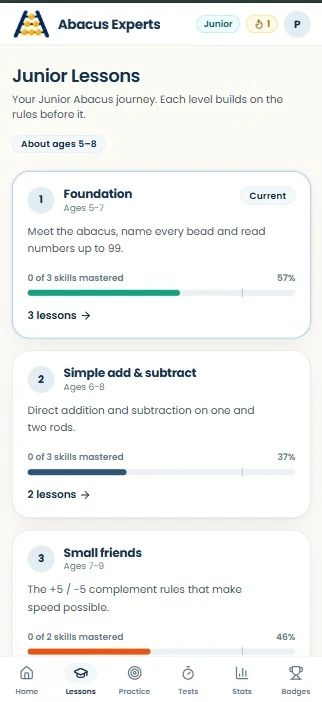
Each level builds on the rules before it, from reading numbers on the frame to exam-style timed papers.
Meet the abacus, learn what each bead is worth and read numbers up to 99.
Direct addition and subtraction on the rods.
The friend-of-5 rules for adding and taking away.
The friend-of-10 rules, carrying and borrowing across rods.
Picture the frame and work sums without it.
Groups, times tables, bigger products and exact division.
Timed drills that build speed while keeping accuracy.
Long chains, larger products, long division and exam-style timed papers.
Online abacus practice that keeps the soroban at the centre: see the method, try it on the beads, get the answer checked.
Tap the heaven and earth beads to set numbers and work sums on a real soroban layout, the same frame children use in class.
Practice happens on the beads, not just on a keypad.
Each lesson opens with a short introduction and a guided demonstration on the abacus that students step through at their own pace.
The rule is seen bead by bead before it is practised.
Every answer is checked straight away, and many wrong answers are followed by a bead-by-bead demonstration of the correct method.
A mistake is corrected before it becomes a habit.
Set a number on the abacus, read a number from the frame, answer “flash the frame” flash cards, work mental sums, multiply and divide.
Reading, setting and picturing the frame are all practised.
Selected lessons run against the clock, with a pause where allowed. Any unlocked skill can be drilled in a standard or timed run, with suggestions for skills worth another look.
Short, focused drills on exactly what needs work.
See the daily streak, questions answered, accuracy, skills mastered and level test results, and earn badges such as First steps, Week warrior, Century and Speed star.
Children and parents can both see the progress.
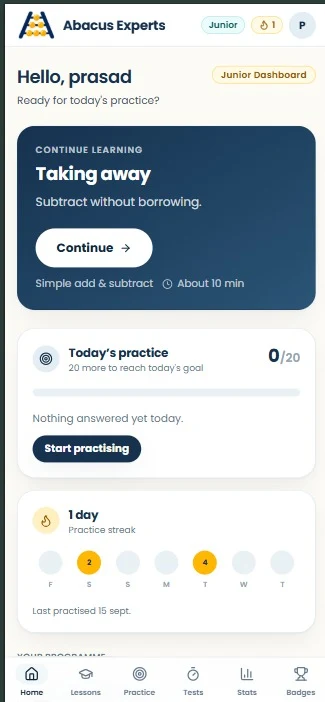
The actual app screens: dashboard, lessons, skill practice, level tests and badges.
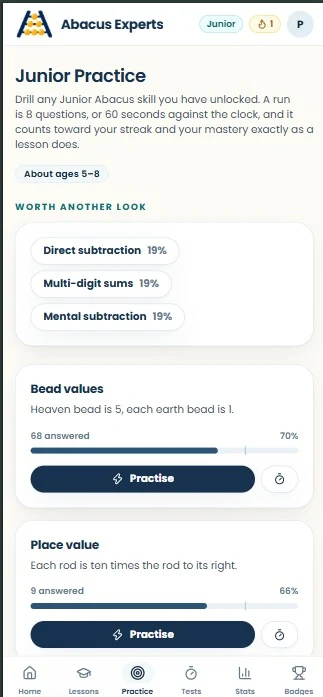
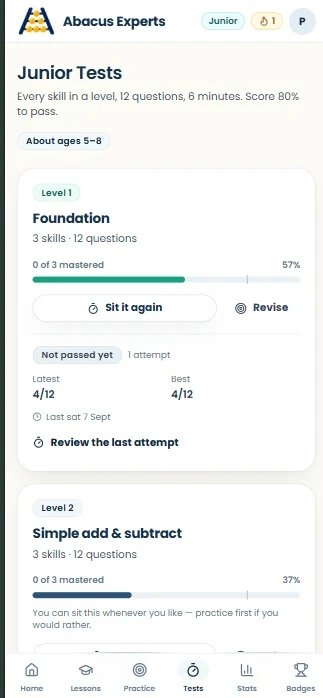
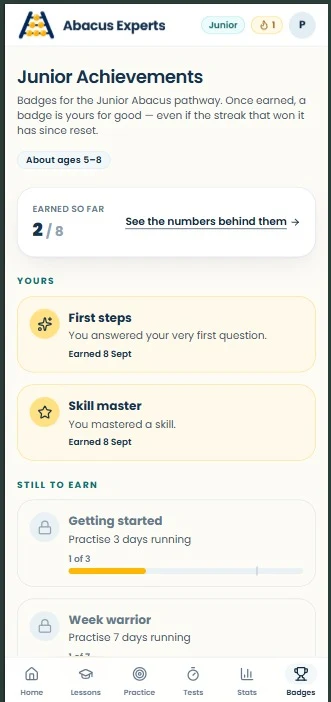
Screenshots from the official Google Play listing. Swipe, scroll or select an image to take a closer look.
The pathway is set by our abacus team when your child enrols, and the app shows the lessons, practice lengths and badges for that pathway.
For first-time learners. Shorter activities with more demonstration and repetition, so the bead rules settle before speed is asked for.
A faster pathway for older beginners, or for children continuing abacus they learned earlier.
Ages are a guide. Placement depends on where your child is starting from, not age alone.
How a lesson in the app runs, from sign-in to saved progress.
Use the mobile number and password linked to your child’s Abacus Experts account, set up when they enrol.
See the programme, the next lesson to continue, the practice streak and recent badges.
Each lesson starts with a short introduction and a guided demonstration on the abacus.
On the abacus, on a number keypad or in the head, depending on the lesson.
A finished lesson is saved to the account, and any lesson can be tried again whenever you like.
Android · Free to download · No ads · Internet needed
| App | Abacus Experts |
|---|---|
| Price | Free to download. No ads or in-app purchases, as stated on Google Play. |
| Who it is for | Children enrolled in our abacus classes, and their parents. An account is needed to sign in. |
| Platform | Android, through the official Google Play listing. Internet needed. |
| Ages | Junior Abacus about 5–8; Senior Abacus about 8–13. |
| Curriculum | Eight levels and 30 lessons on the soroban, including mental abacus. |
| Level tests | Taken on the Abacus Experts website; results appear in the app once marked. |
| Developer | Brolly Software Solutions Pvt Ltd |
| Privacy & support | Read the app privacy policy. Account deletion is available from the app’s Profile screen. |
A few ways to get the most from the app between classes.
Abacus speed comes from regular practice. A short session on most days, kept going with the streak, usually does more than one long session a week.
Sit beside your child for a lesson’s demonstration. Ask them to show you the bead move afterwards: explaining the rule is a good check that it has landed.
The practice screen suggests skills worth revisiting. Pick one of those before starting something new.
The app is very good at the repetition abacus needs: the same bead rules, practised often, checked every time. What it cannot do is watch your child’s fingers on a real abacus and correct the technique in the moment.
That is what the classes are for. Abacus Experts is developed by Brolly Software Solutions Pvt Ltd for our abacus programme, so what is practised at home is what is taught in class.
Our abacus classes run at our centre near Nizampet X Roads, Hyderabad, and online; ask us about current online batches. Either way, the app is how practice continues between sessions.
Access, the curriculum, tests and getting started.
Abacus Experts is the abacus app for kids in Brolly Juniors abacus classes. It brings the soroban (Japanese abacus) to an Android phone with a structured curriculum, an on-screen abacus that students move bead by bead, and a clear view of progress. It is developed by Brolly Software Solutions Pvt Ltd.
The app is free to download, but it needs an Abacus Experts account to sign in. Accounts are set up by our abacus team when a child enrols, so the app is for enrolled students and their parents. If your child is not enrolled yet, book a free abacus demo class first.
There are two pathways. Junior Abacus is for about ages 5–8, with shorter activities and more demonstration and repetition. Senior Abacus is for about ages 8–13, a faster pathway for older beginners or children continuing earlier learning. The pathway is set when your child enrols.
Eight levels and 30 lessons: Foundation, Simple add & subtract, Small friends (friend-of-5 rules), Big friends (friend-of-10 rules), Mental abacus, Multiply & divide, Competition speed and Grand master, which covers long chains, larger products, long division and exam-style timed papers.
Yes. The Mental abacus level teaches students to picture the frame and work sums without it, and some lessons ask for answers worked in the head rather than on the beads. Flash-card style “flash the frame” questions train reading the abacus quickly.
It is free to download on Google Play. The listing states no ads and no in-app purchases. The lessons are part of your child’s abacus programme, which is enrolled separately.
Level tests are taken on the Abacus Experts website. Results appear in the app once they are marked, alongside scores and attempts for each level.
Lessons finished in the app are saved to your child’s account. Progress and mastery figures come from work recorded on the website, and practice runs done in the app are not yet counted towards them.
Yes. An internet connection is needed to sign in and to load lessons.
Abacus Experts is an Android app, available for phones and tablets through Google Play. No iPhone version is listed.
Lessons, instant feedback and timed drills on the soroban, with Abacus Experts on your child’s phone.
Free to download · Ages 5–13 · Android · No ads · For enrolled students